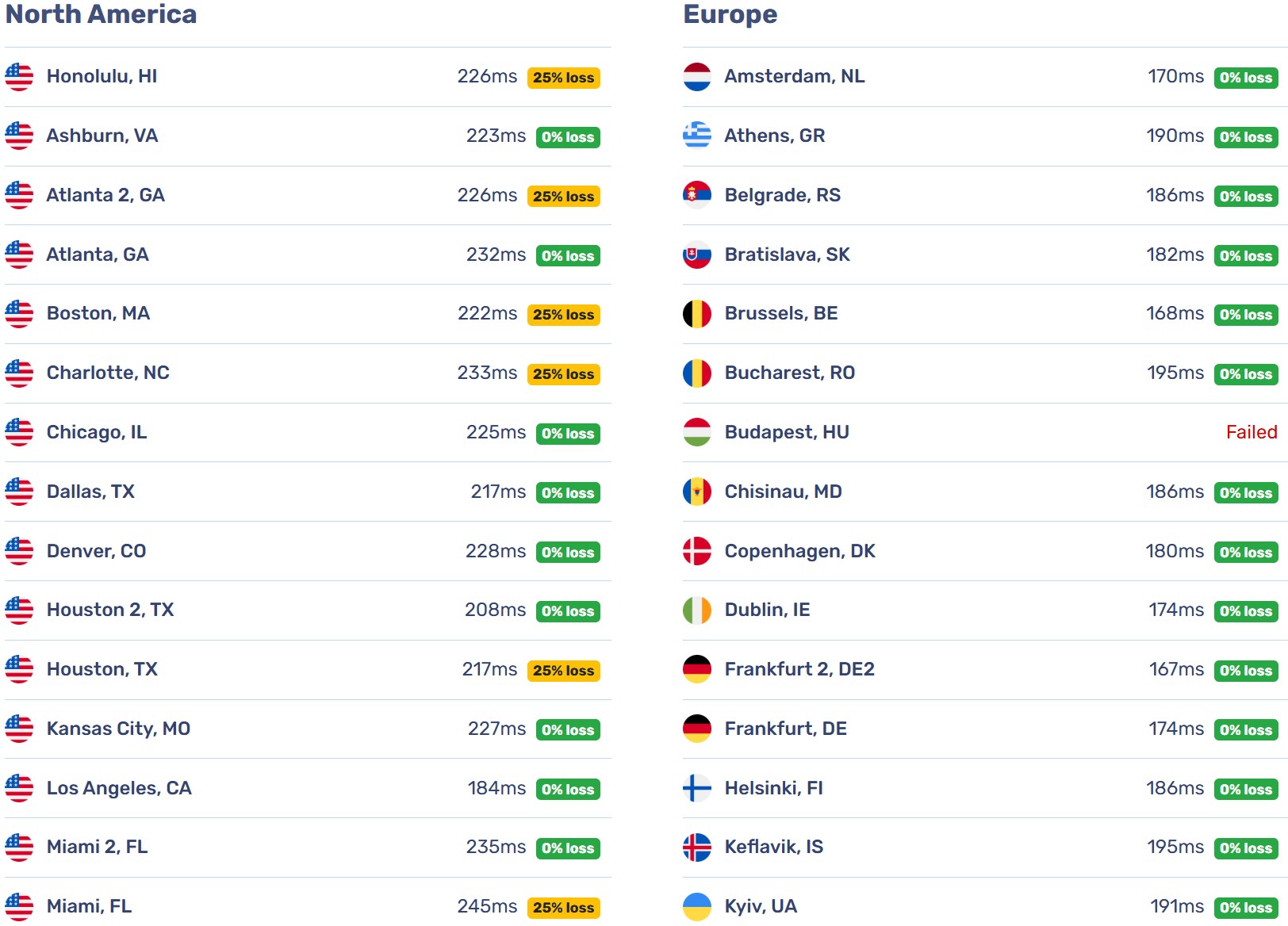
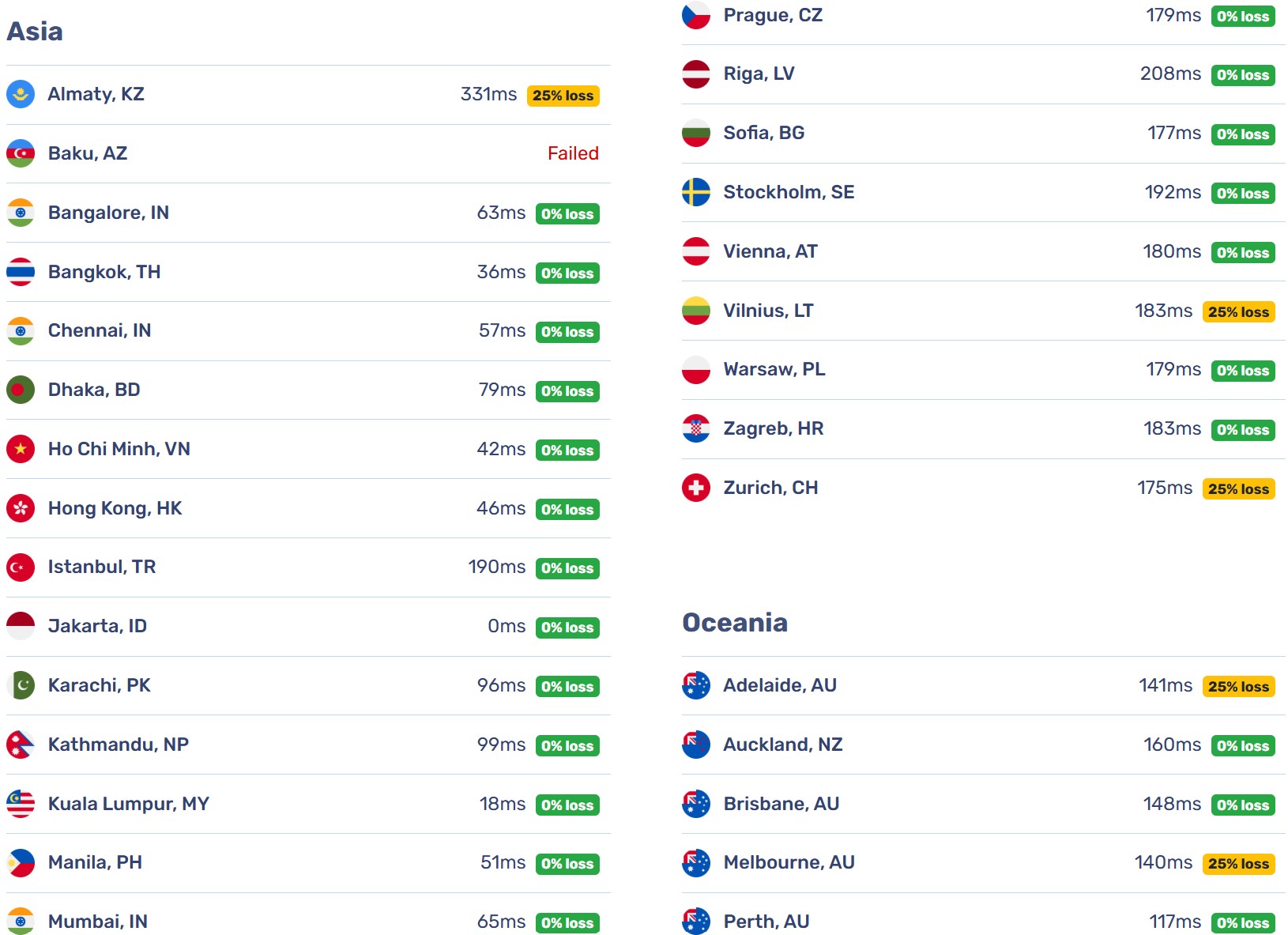
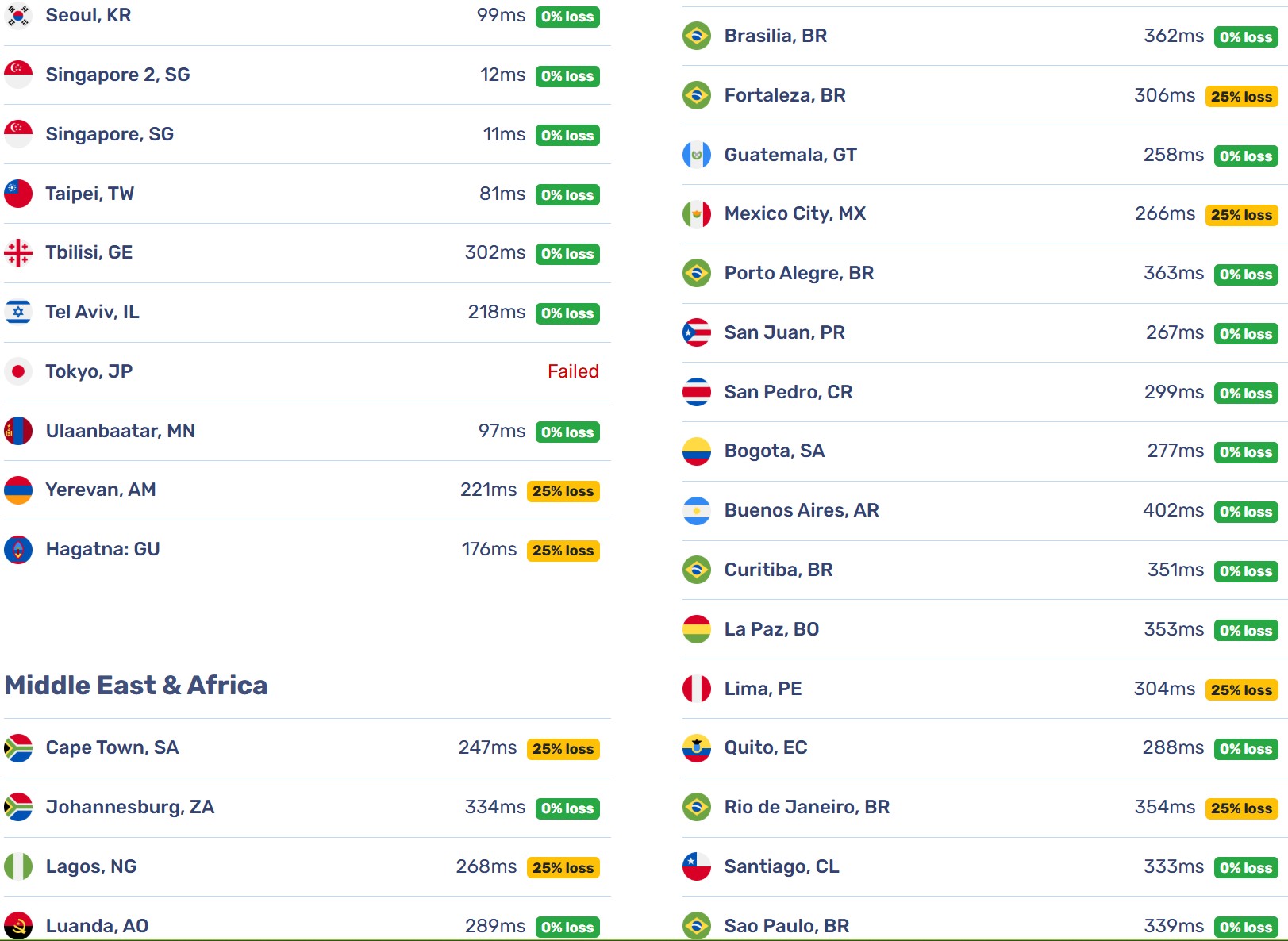
Hasil Benchmark VPS Warnahost 2 Core AMD EPYC 2 GB RAM – ID
Konteks & Spesifikasi
- Warnahost VM2 CPU CLOCK 3 GHZ (AS141120) · Jakarta, Indonesia.
- AMD EPYC 7302 16-Core Processor / 2 core / 2 GB DDR4 / 30 GB SSD / KVM.
- Fitur CPU lengkap (AES, AVX, AVX2, SHA-NI) · Tanpa Swap · IPv6 non-aktif.
CPU & Komputasi Umum
- Geekbench 5: SC 954, MC 1835 (v5.5.1).
- Geekbench 6: SC 1217, MC 2225 (v6.3.0).
- UnixBench: Single 1432.2, Multi 2786.0: Kinerja multi-core sangat baik, melebihi ekspektasi 2 vCPU.
- PassMark: CPU Mark 3970, Single-Thread 2080 (v11.0.1004): Skor single-thread tinggi, ideal untuk beban kerja single-threaded seperti PHP.
Memori
- 2 GB total (1.5 GB tersedia) · Memory Mark 983 · latensi 60 ns.
- Tidak ada partisi Swap; VPS ini berisiko tinggi mengalami OOM (Out of Memory) jika menjalankan DB/WP dengan trafik tinggi.
Penyimpanan (NVMe)
- I/O sekuensial rata-rata ~813.7 MB/s (Bench.sh); performa sekuensial sangat cepat.
- FIO ringkas: ~85.0K IOPS (total kombinasi R/W); performa random access 4k IOPS sangat tinggi.
- YABS 50/50 R/W (utama saja): 4k ~54.0K IOPS, 64k ~23.0K IOPS, 512k–1M ~2.88 GB/s.
- Kapasitas/terpakai: 29 GB / 3.5 GB (12% terpakai).
Jaringan & Latensi
- Speedtest CLI (Jakarta): DL 6255.73 Mbps / UL 7022.60 Mbps, idle 0.40 ms, loss 0.0%.
- Massive Global/Region: rata-rata DL ~1849 Mbps / UL ~840 Mbps; nearest 6339 Mbps/7209 Mbps.
- iperf3 (Singapore): ~1.4 Gbps (Send) / ~1.6 Gbps (Recv).
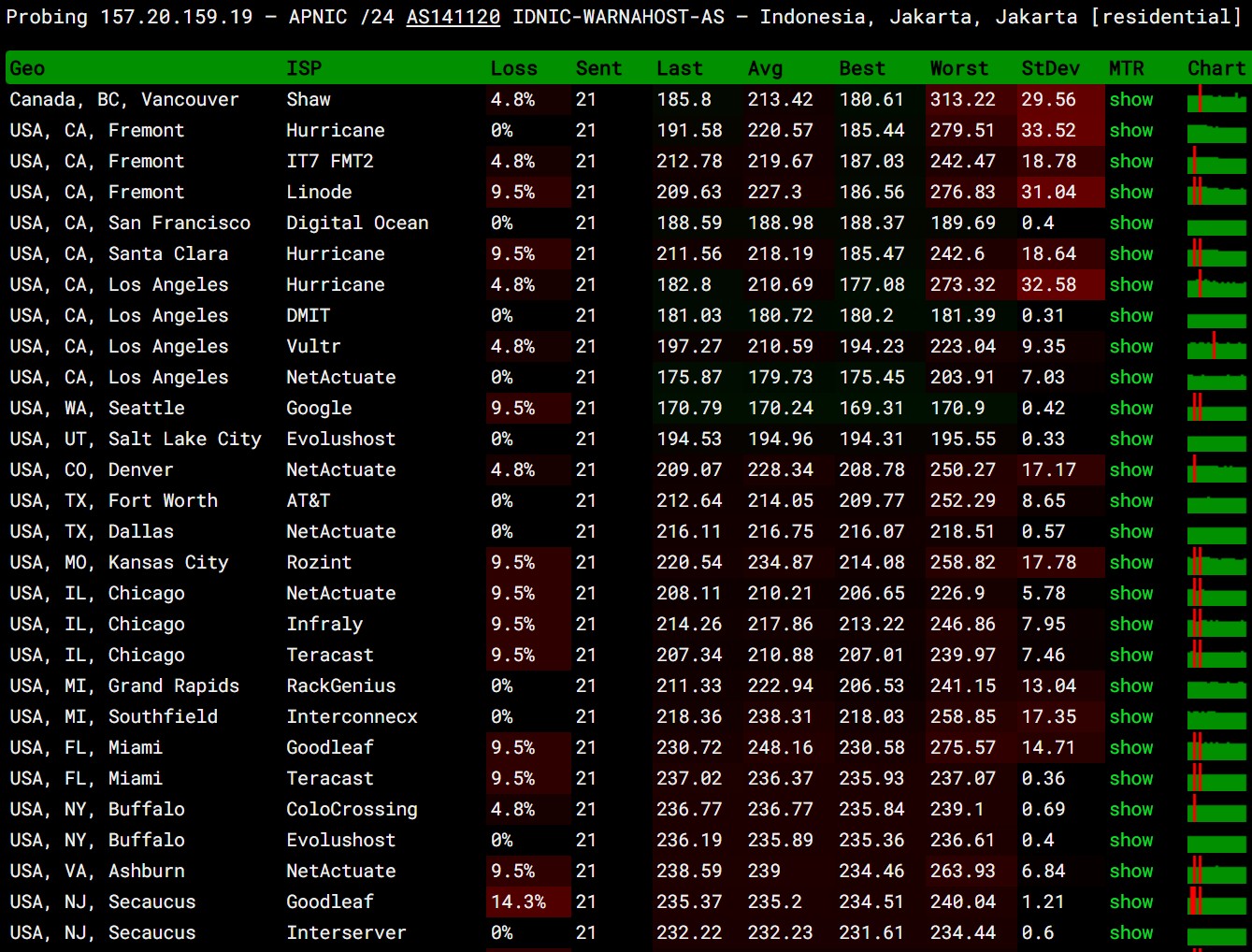
- Kesimpulan jaringan: Latensi domestik mendekati 0 ms, kecepatan lokal mencapai batas 10 Gbps, dan rute internasional ke Asia Tenggara sangat unggul.
WordPress/Hosting
- WP Hosting Benchmark Tool: 7.7: Skor yang sangat baik, menunjukkan VPS ini siap untuk hosting WordPress menengah ke atas.
Platform & Sistem
- Virtualisasi KVM, frekuensi terlapor ~3.0 GHz (AMD EPYC).
- Fitur CPU: AVX2, AES, SHA-NI aktif · IPv4/IPv6: IPv4 aktif/IPv6 non-aktif.
Catatan Teknis & Rekomendasi
- Wajib Implementasi Swap: Mengingat hanya 2 GB RAM, segera terapkan zRAM atau swap file minimal 1–2 GB untuk mencegah OOM.
- Tuning DB: Meskipun IOPS sangat tinggi, pastikan konfigurasi DB (mis. MySQL/PostgreSQL) tidak boros memori.
- Cocok untuk WP/Litespeed: Kombinasi CPU SC yang kuat, RAM cepat, dan NVMe premium ideal untuk beban kerja WP/caching/DB kecil.
- Potensi Global CDN: Kecepatan global bervariasi; manfaatkan CDN (Cloudflare/sejenisnya) untuk melayani trafik non-Asia.
- Cek Log LA: Kinerja UnixBench sangat tinggi; monitor Load Average untuk memastikan alokasi CPU stabil di lingkungan shared.
Kesimpulan singkat
Performa komputasi dan I/O penyimpanan berada di level premium, menjadikannya pilihan unggul untuk hosting WordPress atau aplikasi dengan trafik Indonesia; namun, alokasi RAM 2 GB tanpa Swap menimbulkan risiko stabilitas serius.
- Rating keseluruhan: ⭐⭐⭐⭐✩

Spesifikasi singkat VPS yang akan dibenchmark:
Provider      : Warnahost| warnahost.com
Type/Plan     : VM2 CPU CLOCK 3 GHZ
Processor     : AMD EPYC Processor
Num of Core   : 2 Cores
Memory        : 2 GB DDR4
Storage       : 30 GB SSD
Bandwidth     : unlimited @ 10 Gbps
Location      : Jakarta (ID)
Price : 11 USDSpesifikasi VPS via lscpu
Architecture:                x86_64
  CPU op-mode(s):            32-bit, 64-bit
  Address sizes:             48 bits physical, 48 bits virtual
  Byte Order:                Little Endian
CPU(s):                      2
  On-line CPU(s) list:       0,1
Vendor ID:                   AuthenticAMD
  Model name:                AMD EPYC 7302 16-Core Processor
    CPU family:              23
    Model:                   49
    Thread(s) per core:      1
    Core(s) per socket:      2
    Socket(s):               1
    Stepping:                0
    BogoMIPS:                5999.99
    Flags:                   fpu vme de pse tsc msr pae mce cx8 apic sep mtrr pge mca cmov pat pse36 clflush mmx fxsr sse sse2 ht syscall nx mmxex
                             t fxsr_opt pdpe1gb rdtscp lm rep_good nopl cpuid extd_apicid tsc_known_freq pni pclmulqdq ssse3 fma cx16 sse4_1 sse4_
                             2 x2apic movbe popcnt tsc_deadline_timer aes xsave avx f16c rdrand hypervisor lahf_lm cmp_legacy svm cr8_legacy abm s
                             se4a misalignsse 3dnowprefetch osvw perfctr_core ssbd ibrs ibpb stibp vmmcall fsgsbase tsc_adjust bmi1 avx2 smep bmi2
                              rdseed adx smap clflushopt clwb sha_ni xsaveopt xsavec xgetbv1 clzero xsaveerptr wbnoinvd arat npt lbrv nrip_save ts
                             c_scale vmcb_clean flushbyasid pausefilter pfthreshold v_vmsave_vmload vgif umip rdpid overflow_recov succor arch_cap
                             abilities
Virtualization features:
  Virtualization:            AMD-V
  Hypervisor vendor:         KVM
  Virtualization type:       full
Caches (sum of all):
  L1d:                       128 KiB (2 instances)
  L1i:                       128 KiB (2 instances)
  L2:                        1 MiB (2 instances)
  L3:                        32 MiB (2 instances)
NUMA:
  NUMA node(s):              1
NUMA node0 CPU(s): 0,1Memory default via free -h --total
               total        used        free      shared  buff/cache   available
Mem:           1.9Gi       207Mi       624Mi       1.0Mi       1.1Gi       1.5Gi
Swap:             0B          0B          0B
Total: 1.9Gi 207Mi 624MiStorage default via df -hT --total
Filesystem     Type   Size  Used Avail Use% Mounted on
tmpfs          tmpfs  197M  1.1M  196M   1% /run
/dev/sda1      ext4    29G  3.5G   26G  12% /
tmpfs          tmpfs  982M     0  982M   0% /dev/shm
tmpfs          tmpfs  5.0M     0  5.0M   0% /run/lock
/dev/sda15     vfat   105M  6.1M   99M   6% /boot/efi
tmpfs          tmpfs  197M  4.0K  197M   1% /run/user/0
total - 31G 3.5G 27G 12% -Default SWAP or partition via swapon --show
xxx No default SWAP or other partition xxxUntuk yang pertama kali nimbrung disini, mungkin ada baiknya untuk baca 2 artikel ini terlebih dahulu:
– Metodologi Benchmark ala KangServer.id
– Syarat dan Kriteria Server (VPS) yang Akan KangServer Benchmark
Benchmark Summary
Geekbench 5
954
Single Core Score
1835
Multi Core Score
Higher is better – v5.5.1
Geekbench 6
1217
Single Core Score
2225
Multi Core Score
Higher is better – v6.3.0
PerformanceTest
2080
CPU Single Threaded
3970
CPU Mark
Higher is better – v11.0
UnixBench
1432.2
Single Copy SBIS
2786.0
Multi Copy SBIS
Higher is better – v5.1.3
Storage I/O Speed
813.7
Average I/O Speed (MB/s)
Higher is better
Flexible IO Tester (FIO)
85.0
Total IOPS Combined (K)
Higher is better
WP Hosting Benchmark Tool
7.7
Average Score
Higher is better
Detailed Benchmark
– Geekbench 5
Software by Primate Labs Inc.
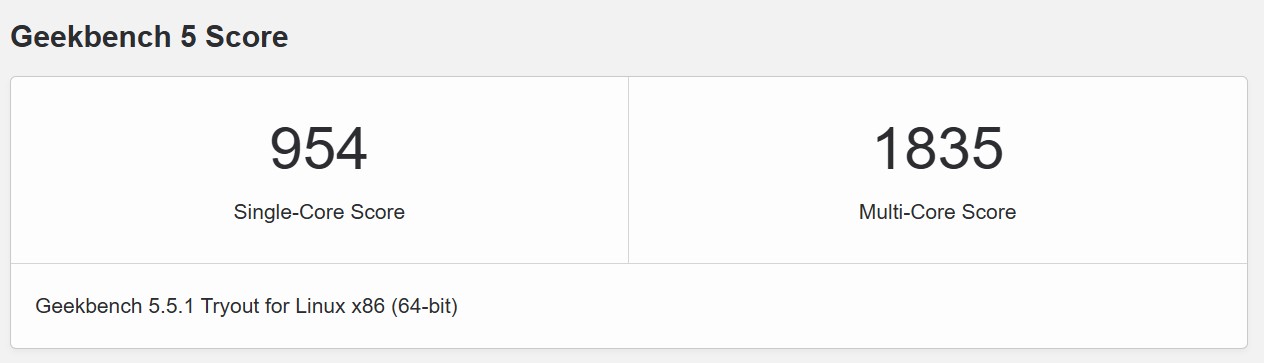
Link Geekbench 5: VPS AMD EPYC WARNAHOST 2 CORE 2 GB RAM
– Geekbench 6
Software by Primate Labs Inc.
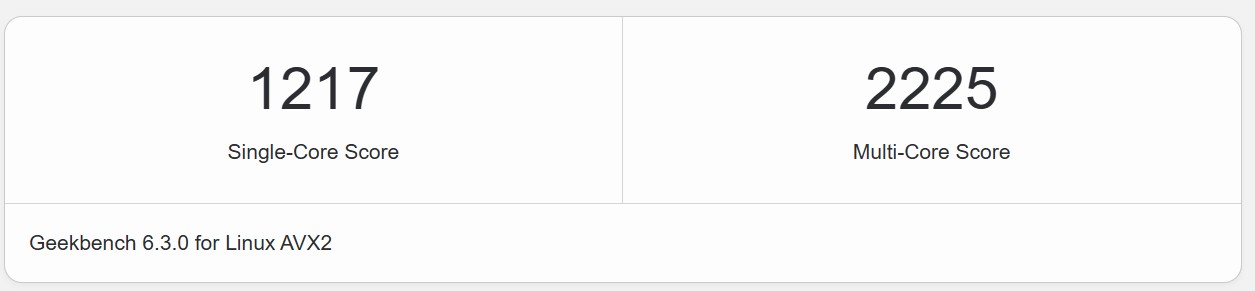
Link Geekbench 6: VPS AMD EPYC WARNAHOST 2 CORE 2 GB RAM
– PerformanceTest
Software by PassMark Software Pty Ltd
                   PassMark PerformanceTest Linux (11.0.1004)


AMD EPYC 7302 16-Core Processor                 (x86_64)
2 cores @ 0 MHz  |  1.9 GiB RAM
Number of Processes: 2  |  Test Iterations: 1  |  Test Duration: Medium
--------------------------------------------------------------------------------
CPU Mark:                          3970
  Integer Math                     9232 Million Operations/s
  Floating Point Math              6670 Million Operations/s
  Prime Numbers                    27.3 Million Primes/s
  Sorting                          5431 Thousand Strings/s
  Encryption                       2236 MB/s
  Compression                      40409 KB/s
  CPU Single Threaded              2080 Million Operations/s
  Physics                          494 Frames/s
  Extended Instructions (SSE)      3007 Million Matrices/s

Memory Mark:                       983
  Database Operations              1190 Thousand Operations/s
  Memory Read Cached               23031 MB/s
  Memory Read Uncached             9825 MB/s
  Memory Write                     9656 MB/s
  Available RAM                    627 Megabytes
  Memory Latency                   60 Nanoseconds
  Memory Threaded                  18963 MB/s
--------------------------------------------------------------------------------– UnixBench
Script GitHub by Kelly Lucas
Dhrystone 2 using register variables         116700.0   38141903.9   3268.4
Double-Precision Whetstone                       55.0       6902.5   1255.0
Execl Throughput                                 43.0       3472.9    807.6
File Copy 1024 bufsize 2000 maxblocks          3960.0    1103335.0   2786.2
File Copy 256 bufsize 500 maxblocks            1655.0     312750.9   1889.7
File Copy 4096 bufsize 8000 maxblocks          5800.0    2887303.7   4978.1
Pipe Throughput                               12440.0    1726411.3   1387.8
Pipe-based Context Switching                   4000.0      52900.1    132.3
Process Creation                                126.0       6179.2    490.4
Shell Scripts (1 concurrent)                     42.4      10265.0   2421.0
Shell Scripts (8 concurrent)                      6.0       1998.5   3330.8
System Call Overhead                          15000.0    1773077.3   1182.1
                                                                   ========
System Benchmarks Index Score                                        1432.2

------------------------------------------------------------------------
Benchmark Run: Tue Jan 27 2026 14:32:15 - 15:00:17
2 CPUs in system; running 2 parallel copies of tests

Dhrystone 2 using register variables       74926860.1 lps   (10.0 s, 7 samples)
Double-Precision Whetstone                    13714.0 MWIPS (9.9 s, 7 samples)
Execl Throughput                               5589.4 lps   (29.6 s, 2 samples)
File Copy 1024 bufsize 2000 maxblocks       1630895.0 KBps  (30.0 s, 2 samples)
File Copy 256 bufsize 500 maxblocks          552749.1 KBps  (30.0 s, 2 samples)
File Copy 4096 bufsize 8000 maxblocks       4943613.2 KBps  (30.0 s, 2 samples)
Pipe Throughput                             3203814.8 lps   (10.0 s, 7 samples)
Pipe-based Context Switching                 340238.1 lps   (10.0 s, 7 samples)
Process Creation                              16235.9 lps   (30.0 s, 2 samples)
Shell Scripts (1 concurrent)                  16148.2 lpm   (60.0 s, 2 samples)
Shell Scripts (8 concurrent)                   2138.5 lpm   (60.0 s, 2 samples)
System Call Overhead                        3509153.0 lps   (10.0 s, 7 samples)

System Benchmarks Index Values               BASELINE       RESULT    INDEX
Dhrystone 2 using register variables         116700.0   74926860.1   6420.5
Double-Precision Whetstone                       55.0      13714.0   2493.5
Execl Throughput                                 43.0       5589.4   1299.9
File Copy 1024 bufsize 2000 maxblocks          3960.0    1630895.0   4118.4
File Copy 256 bufsize 500 maxblocks            1655.0     552749.1   3339.9
File Copy 4096 bufsize 8000 maxblocks          5800.0    4943613.2   8523.5
Pipe Throughput                               12440.0    3203814.8   2575.4
Pipe-based Context Switching                   4000.0     340238.1    850.6
Process Creation                                126.0      16235.9   1288.6
Shell Scripts (1 concurrent)                     42.4      16148.2   3808.5
Shell Scripts (8 concurrent)                      6.0       2138.5   3564.1
System Call Overhead                          15000.0    3509153.0   2339.4
                                                                   ========
System Benchmarks Index Score 2786.0– Benchy
# # # # # # # # # # # # # # # # # # # # #
#             Benchy v2.8               #
#    https://github.com/L1so/benchy     #
# # # # # # # # # # # # # # # # # # # # #
#        28 Jan 2026 05:33 UTC          #
# # # # # # # # # # # # # # # # # # # # #

Server Insight                                  Hardware Information
---------------------                           ---------------------
OS         : Ubuntu 22.04.5 LTS                 Model       : AMD EPYC 7302 16-Core Processor
Location   : Indonesia                          Core        : 2 @ 2999.998 MHz
Kernel     : 5.15.0-161-generic                 AES-NI      : ✔ Enabled
Uptime     : 1 days, 18 hrs, 54 mins, 34 secs   VM-x/AMD-V  : ✔ Enabled
Virt       : kvm                                Swap        : 0.0 KiB

Disk & Memory Usage                             Network Information
---------------------                           ---------------------
Disk (1)   : 28.9 GiB                           ASN         : AS141120
Disk Usage : 3.0 GiB (10% Used)                 ISP         : PT Warna Data Multimedia
Mem        : 1.9 GiB                            IPv4        : ✔ Enabled
Mem Usage  : 0.2 GiB (11% Used)                 IPv6        : ❌ Disabled

Disk Performance Check (ext4 on /dev/sda1) (R: Read, W: Write, T: Total)
+---------------------------------------------------------------------------+
| Size | Read        | Write       | Total       |       IOPS (R,W,T)       |
+===========================================================================+
| 4k   | 110.47 MB/s | 110.76 MB/s | 221.23 MB/s | 28.3k  | 28.4k  | 56.6k  |
| 64k  | 908.64 MB/s | 913.42 MB/s | 1.77 GB/s   | 14.5k  | 14.6k  | 29.1k  |
| 512k | 1.40 GB/s   | 1.47 GB/s   | 2.88 GB/s   | 2.9k   | 3.0k   | 5.9k   |
| 1m   | 1.39 GB/s   | 1.49 GB/s   | 2.88 GB/s   | 1.4k   | 1.5k   | 3.0k   |
+---------------------------------------------------------------------------+

Network Performance Test (Region: Mixed)
+---------------------------------------------------------------------------------+
| Prot. | Provider    | Location        | Send         | Receive      | Latency   |
+---------------------------------------------------------------------------------+
| IPv4  | Airstream   | Wisconsin, US   |        busy  |  308.9 Mb/s  |    0.0 ms |
|       | Uztelecom   | Tashkent, UZ    |        busy  |        busy  |    0.0 ms |
|       | Novogara    | Amsterdam, NL   |  225.0 Mb/s  |        busy  |    0.0 ms |
|       | FiberBy     | Copenhagen, DK  |        busy  |  305.1 Mb/s  |    0.0 ms |
+---------------------------------------------------------------------------------+– Bench.sh
Script GitHub by Teddysun
-------------------- A Bench.sh Script By Teddysun -------------------
 Version            : v2025-05-08
 Usage              : wget -qO- bench.sh | bash
----------------------------------------------------------------------
 CPU Model          : AMD EPYC 7302 16-Core Processor
 CPU Cores          : 2 @ 2999.998 MHz
 CPU Cache          : 512 KB
 AES-NI             : ✓ Enabled
 VM-x/AMD-V         : ✓ Enabled
 Total Disk         : 29.0 GB (2.8 GB Used)
 Total Mem          : 1.9 GB (204.7 MB Used)
 System uptime      : 1 days, 3 hour 42 min
 Load average       : 0.72, 0.70, 0.51
 OS                 : Ubuntu 22.04.5 LTS
 Arch               : x86_64 (64 Bit)
 Kernel             : 5.15.0-161-generic
 TCP CC             : cubic
 Virtualization     : KVM
 IPv4/IPv6          : ✓ Online / ✗ Offline
 Organization       : AS141120 PT Warna Data Multimedia
 Location           : Jakarta / ID
 Region             : Jakarta
----------------------------------------------------------------------
 I/O Speed(1st run) : 508 MB/s
 I/O Speed(2nd run) : 909 MB/s
 I/O Speed(3rd run) : 1.0 GB/s
 I/O Speed(average) : 813.7 MB/s
----------------------------------------------------------------------
 Node Name        Upload Speed      Download Speed      Latency
 Speedtest.net    6482.83 Mbps      5785.35 Mbps        0.47 ms
 Paris, FR        132.16 Mbps       847.00 Mbps         164.56 ms
 Hong Kong, CN    551.03 Mbps       512.94 Mbps         51.48 ms
 Singapore, SG    757.55 Mbps       615.37 Mbps         12.37 ms
 Tokyo, JP        287.04 Mbps       34.27 Mbps          81.64 ms
----------------------------------------------------------------------– Yet Another Bench Script (YABS)
Script GitHub by Mason Rowe
---------------------------------
Uptime     : 1 days, 3 hours, 50 minutes
Processor  : AMD EPYC 7302 16-Core Processor
CPU cores  : 2 @ 2999.998 MHz
AES-NI     : ✔ Enabled
VM-x/AMD-V : ✔ Enabled
RAM        : 1.9 GiB
Swap       : 0.0 KiB
Disk       : 29.0 GiB
Distro     : Ubuntu 22.04.5 LTS
Kernel     : 5.15.0-161-generic
VM Type    : KVM
IPv4/IPv6  : ✔ Online / ❌ Offline

IPv4 Network Information:
---------------------------------
ISP        : PT Warna Data Multimedia
ASN        : AS141120 PT Warna Data Multimedia
Host       : CV Caesar Awan Multidata Jaya
Location   : Jakarta, Jakarta (JK)
Country    : Indonesia

fio Disk Speed Tests (Mixed R/W 50/50) (Partition /dev/sda1):
---------------------------------
Block Size | 4k            (IOPS) | 64k           (IOPS)
  ------   | ---            ----  | ----           ----
Read       | 107.99 MB/s  (26.9k) | 735.71 MB/s  (11.4k)
Write      | 108.28 MB/s  (27.0k) | 739.59 MB/s  (11.5k)
Total      | 216.27 MB/s  (54.0k) | 1.47 GB/s    (23.0k)
           |                      |
Block Size | 512k          (IOPS) | 1m            (IOPS)
  ------   | ---            ----  | ----           ----
Read       | 1.23 GB/s     (2.4k) | 1.54 GB/s     (1.5k)
Write      | 1.30 GB/s     (2.5k) | 1.64 GB/s     (1.6k)
Total      | 2.54 GB/s     (4.9k) | 3.18 GB/s     (3.1k)

iperf3 Network Speed Tests (IPv4):
---------------------------------
Provider        | Location (Link)           | Send Speed      | Recv Speed      | Ping
-----           | -----                     | ----            | ----            | ----
Clouvider       | London, UK (10G)          | 426 Mbits/sec   | 464 Mbits/sec   | --
Eranium         | Amsterdam, NL (100G)      | 223 Mbits/sec   | 512 Mbits/sec   | --
Uztelecom       | Tashkent, UZ (10G)        | 601 Mbits/sec   | 476 Mbits/sec   | --
Leaseweb        | Singapore, SG (10G)       | 1.39 Gbits/sec  | 1.61 Gbits/sec  | --
Clouvider       | Los Angeles, CA, US (10G) | busy            | 1.35 Mbits/sec  | --
Leaseweb        | NYC, NY, US (10G)         | 348 Mbits/sec   | 560 Mbits/sec   | --
Edgoo | Sao Paulo, BR (1G) | 227 Mbits/sec | 299 Mbits/sec | --– Speedtest.net CLI
Software by Speedtest.net
   Speedtest by Ookla

      Server: Fibertrust - Jakarta (id: 21296)
         ISP: PT Warna Data Multimedia
Idle Latency:     0.40 ms   (jitter: 0.05ms, low: 0.38ms, high: 0.44ms)
    Download:  6255.73 Mbps (data used: 4.2 GB)
                  1.15 ms   (jitter: 4.25ms, low: 0.57ms, high: 209.67ms)
      Upload:  7022.60 Mbps (data used: 6.5 GB)
                  1.11 ms   (jitter: 0.28ms, low: 0.61ms, high: 5.29ms)
 Packet Loss:     0.0%
  Result URL: https://www.speedtest.net/result/c/8bc58114-36c0-4102-bf84-90548265f730
root@vpsmetrics:~#– Speedtest Benchmark Script (Global Test)
Script by nws.sh
 Speedtest.net (Region: GLOBAL)
---------------------------------------------------------------------------
 Location         Latency     Loss    DL Speed       UP Speed       Server

 ISP: PT Warna Data Multimedia

 Nearest          0.47 ms     0.0%    6339.60 Mbps   7209.91 Mbps   Fibertrust - Jakarta

 Bangalore, IN    170.51 ms   0.0%    1085.02 Mbps   256.15 Mbps    Bharti Airtel Ltd - Bangalore
 Chennai, IN      43.59 ms    0.0%    1005.54 Mbps   435.63 Mbps    RailTel Corporation of India Ltd - Chennai
 Mumbai, IN       65.32 ms    0.0%    2891.62 Mbps   470.09 Mbps    Melbicom - Mumbai

 Seattle, US      207.96 ms   N/A     1232.03 Mbps   0.91 Mbps      Comcast - Seattle, WA
 Los Angeles, US  184.99 ms   0.0%    1110.29 Mbps   204.42 Mbps    ReliableSite Hosting - Los Angeles, CA
 Dallas, US       220.92 ms   0.0%    1576.35 Mbps   203.43 Mbps    Hivelocity - Dallas, TX
 Miami, US        258.06 ms   0.0%    873.34 Mbps    190.01 Mbps    Frontier - Miami, FL
 New York, US     250.27 ms   0.0%    905.60 Mbps    159.94 Mbps    GSL Networks - New York, NY
 Toronto, CA      264.81 ms   0.0%    1030.71 Mbps   170.62 Mbps    Rogers - Toronto, ON
 Mexico City, MX  244.66 ms   0.0%    1132.21 Mbps   139.08 Mbps    INFINITUM - Ciudad de México

 London, UK       177.49 ms   0.0%    1098.78 Mbps   234.70 Mbps    VeloxServ Communications - London
 Amsterdam, NL    FAILED
 Paris, FR        159.66 ms   0.0%    1127.99 Mbps   238.23 Mbps    Scaleway - Paris
 Frankfurt, DE    178.00 ms   0.0%    978.66 Mbps    206.42 Mbps    Clouvider Ltd - Frankfurt am Main
 Warsaw, PL       256.50 ms   0.0%    1068.51 Mbps   170.09 Mbps    Play - Warszawa
 Bucharest, RO    198.91 ms   0.0%    526.98 Mbps    181.47 Mbps    Digi
 Moscow, RU       178.67 ms   0.0%    954.89 Mbps    194.34 Mbps    Misaka Network, Inc. - Moscow

 Jeddah, SA       153.56 ms   0.0%    2655.54 Mbps   168.99 Mbps    Saudi Telecom Company
 Dubai, AE        91.98 ms    0.0%    2962.11 Mbps   155.90 Mbps    e& UAE - Dubai
 Istanbul, TR     201.30 ms   0.0%    1965.60 Mbps   230.17 Mbps    Turkcell - Istanbul
 Tehran, IR       245.76 ms   0.0%    1038.81 Mbps   154.79 Mbps    Irancell - Tehran
 Cairo, EG        283.41 ms   2.0%    1186.60 Mbps   132.54 Mbps    Telecom Egypt - Cairo

 Tokyo, JP        FAILED
 Shanghai, CU-CN  FAILED
 Hong Kong, CN    41.52 ms    0.0%    2172.54 Mbps   319.97 Mbps    Misaka Network, Inc. - Hong Kong
 Singapore, SG    13.05 ms    0.0%    2422.64 Mbps   1353.84 Mbps   ViewQwest - Singapore
 Jakarta, ID      0.69 ms     0.0%    6480.70 Mbps   8433.01 Mbps   PT Solnet Indonesia - Jakarta

 Sydney, AU       139.86 ms   0.0%    2260.18 Mbps   244.60 Mbps    Aussie Broadband - Sydney
---------------------------------------------------------------------------
 Avg DL Speed       : 1849.34 Mbps
 Avg UL Speed       : 840.74 Mbps

 Total DL Data      : 67.27 GB
 Total UL Data      : 15.16 GB
 Total Data         : 82.43 GB
---------------------------------------------------------------------------– WP Hosting Benchmark Tool
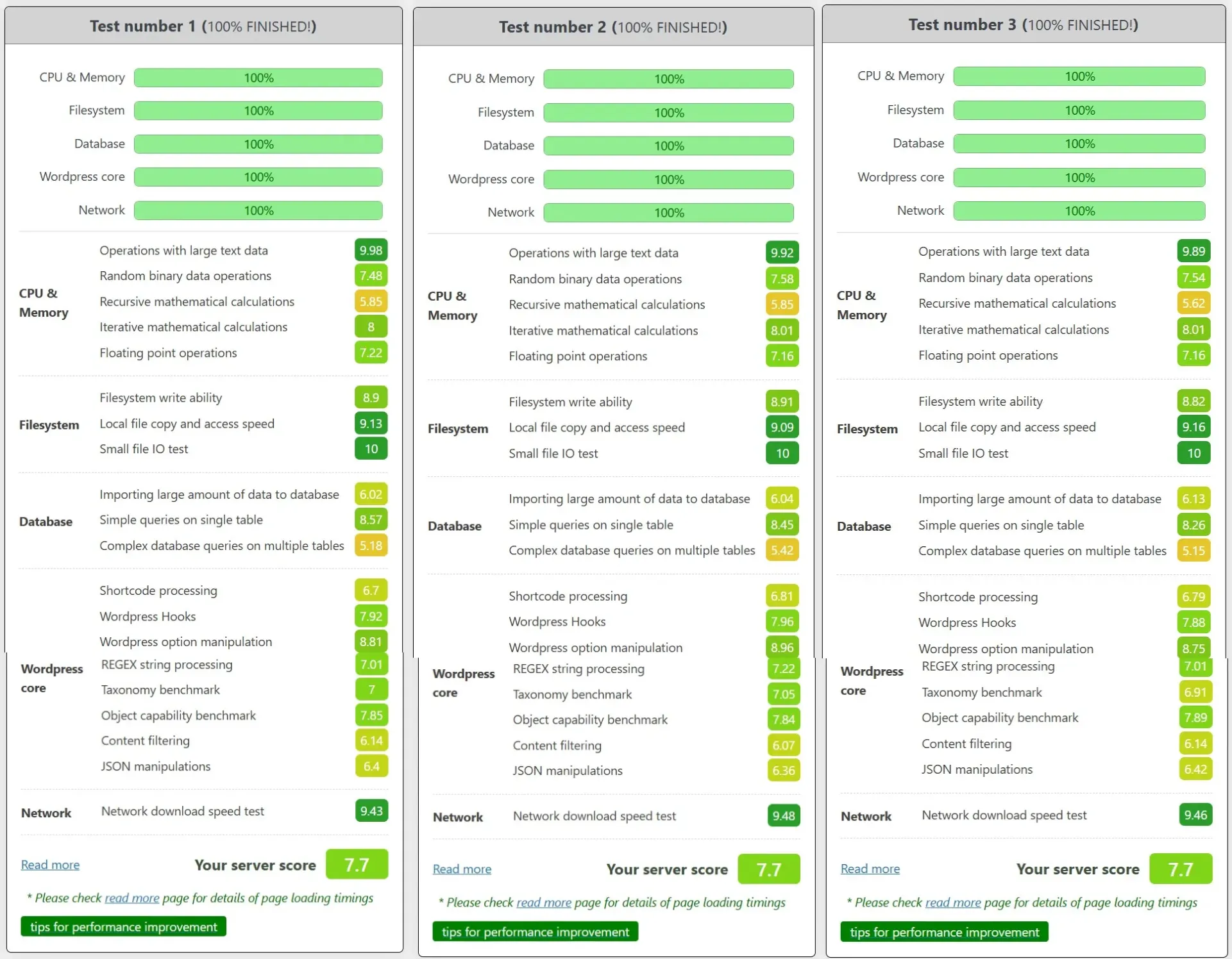
WordPress Plugin by WPBenchmark.io
– Latency Test
PING the IP of VPS
– Check-Host.net
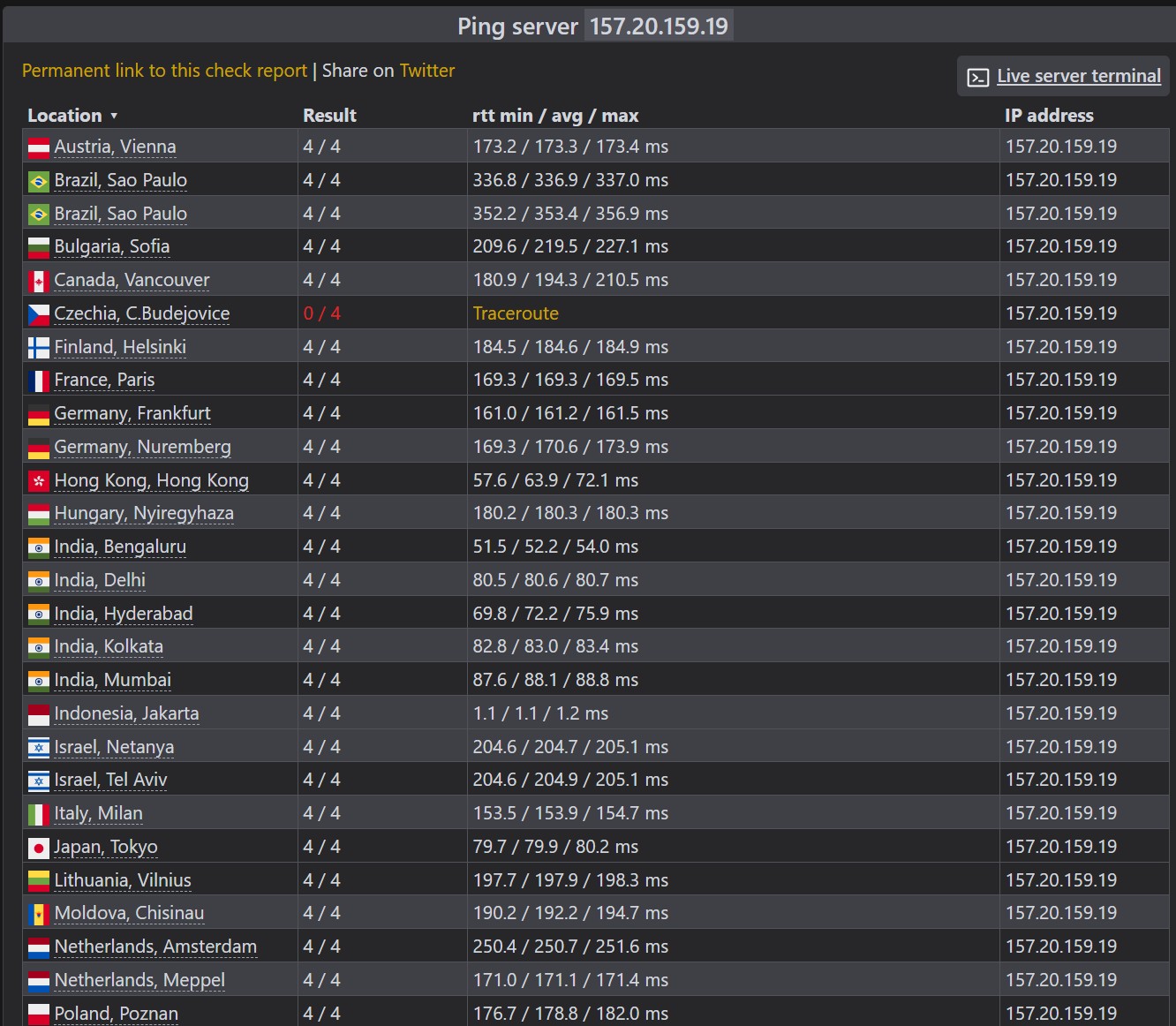
– Vpsmetrics Ping Tool
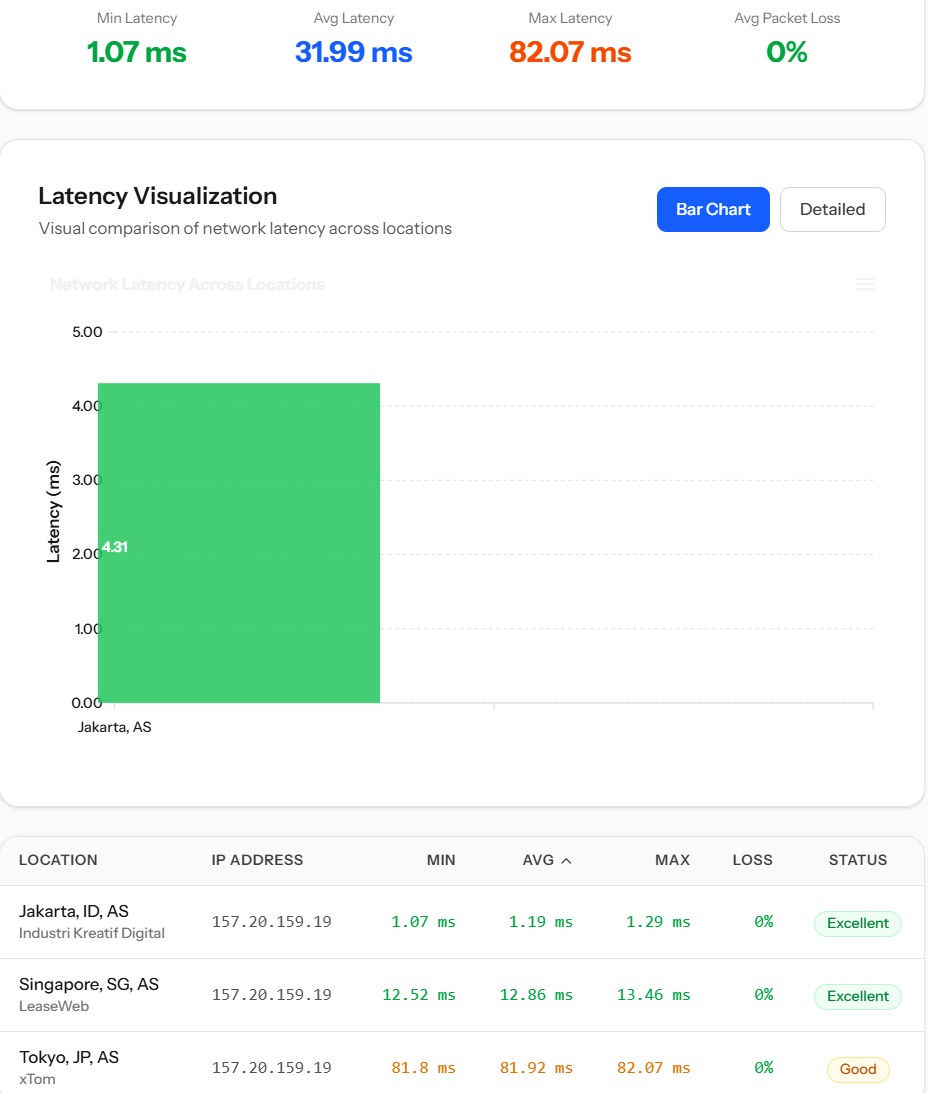
– Ping.pe
– Bunny.net